



As a sales employee, you would like to offer a customer one total price for a package that consists of several items or resources, for example a door including the door handle, hardware and frame. For Business Central, though, it is mandatory to keep the individual lines for each item for internal processing. The problem now is how to create an order so that the items are all added but only the total sum of the package is printed on sales documents.
Let’s have a look at how you can do so!
Create a new Sales Quote including all mandatory fields in the General FastTab.
Enter all required Item and Resource lines that are part of the offered package.
Select the Lines and click on Functions > Summarize Lines in the Lines FastTab menu.

A Line with Type Comment is added above the other lines with Set 1 as Description. If required, you can adjust it, for example, to Door XYZ.
In the top menu, click Print/Send > Print and Preview in the window that opens to show a preview of the Sales Quote. You will see only the comment line will be printed for the Items in the package.

While the Summarize Lines function does the setup for you, you can also do so manually and adjust how the information is shown. To do so, check if the Setcode and Printing Option fields are shown for the Lines. If not, please Personalize the section so they are visible.
As you can see, the Setcode for the Comment and Item lines is the same, namely 1. The Printing Option for the Comment is sum and hidden for the Items.

Change the Printing Option for the Item Lines to without price.
Repeat step 5. Now, you not only see the Comment Line but also the Item Lines including a sum for all three Lines.
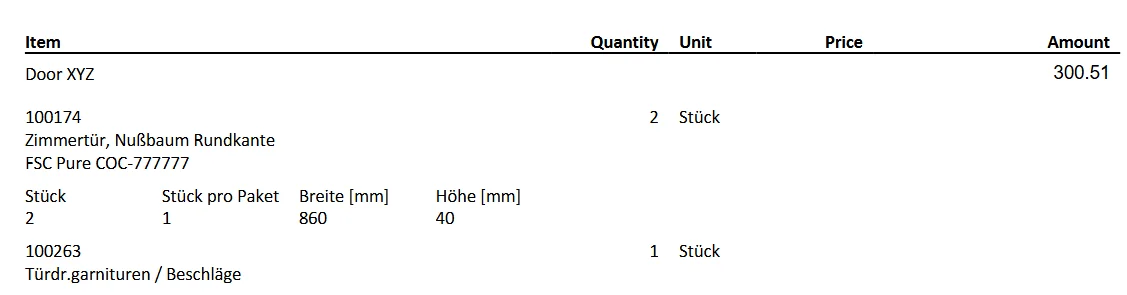
Please note that Setcode and Printing Option also work in a Sales Order.
Therefore, a Sales Quote containing a set can be converted into a Sales Order using the Make Order function without any issues.
However, a set can only be invoiced completely.
If not all set lines are delivered in a Sales Order, the document receives the reason Set is partially shipped in the Reason for CS Block field on the Invoice Details FastTab during the Combine Shipment run.
Now you know how to use Setcode and Printing Option to summarize multiple sales lines into one customer-facing total while keeping the individual Item lines available for internal processing. This improves document clarity for the customer and reduces manual effort, because the sales lines can be grouped and printed as one package price without changing the operational line structure in Business Central.