



As a purchaser, you regularly send purchase orders to vendors and wait for order confirmations, answers to questions, or other responses. Keeping track of all these follow-up moments can become difficult.
Imagine you place an order with a supplier and expect a confirmation within two days. Instead of creating reminders in multiple places, you want a simple way to track when you need to follow up directly from within Business Central.
Let’s see how you can stay on top of your purchase orders!
Open Wood Setup (Purchase).
On the General FastTab, find the Resubmission Date Formula field.
Enter the default number of days after which a follow-up should take place, for example, 3D.
Create a Purchase Order.
In the General FastTab, review the Resubmission Date field that is automatically calculated using the setup formula.
If needed, enter a note in the Resubmission Fixed Date Text field explaining what you are waiting for, for example a price confirmation for item XYZ.

To instantly see what a reminder will look like, adjust the Resubmission Date field to the current date.
Next, close the Purchase Order and go back to your Role Center.
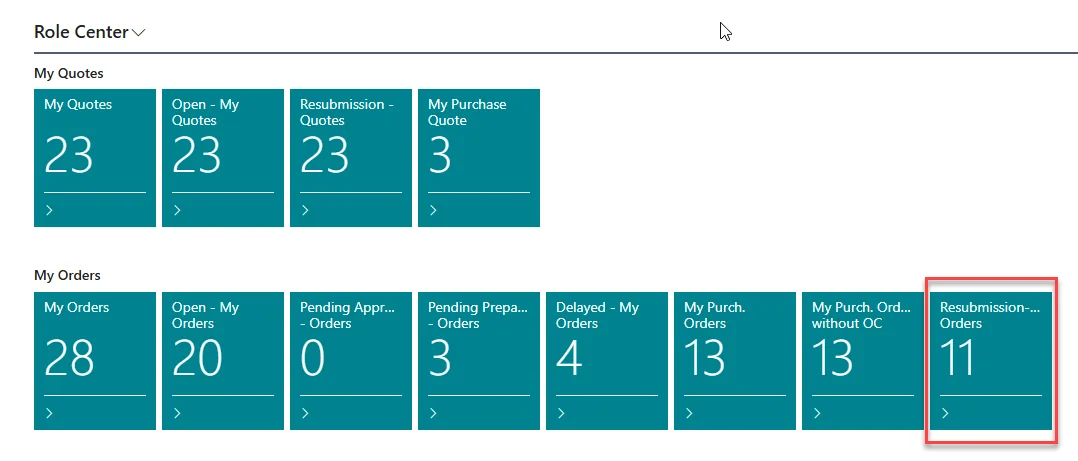
Here you find the Resubmission-My Purch. Orders cue.
Click on it to open an overview of all Purchase Orders that need a follow-up.
By using Resubmission Dates on Purchase Orders, you can easily keep track of vendor follow-ups without relying on external reminders. This helps ensure that important responses are not overlooked and keeps all relevant information together in Business Central.