



You are working in the sales department and a customer calls to ask which items have already been ordered, which items have been shipped, and which quantities are still open. For example, the customer needs an overview before planning the next delivery or checking whether another order is required. Without a combined view, this information can be difficult to collect quickly from several sales documents.
Let’s see what you can do to answer the customers’ questions quickly and may even provide an overview for them.
A customer calls asking about existing orders to see if another one is necessary. To check, open Sales Overview.
On the Filter FastTab, enter the Customer No. of the Customer who you have on the phone to show information for one specific Customer.
As the customer is asking about the existing Sales Orders, select Order in the Filter FastTab to show only Sales Order-related information.
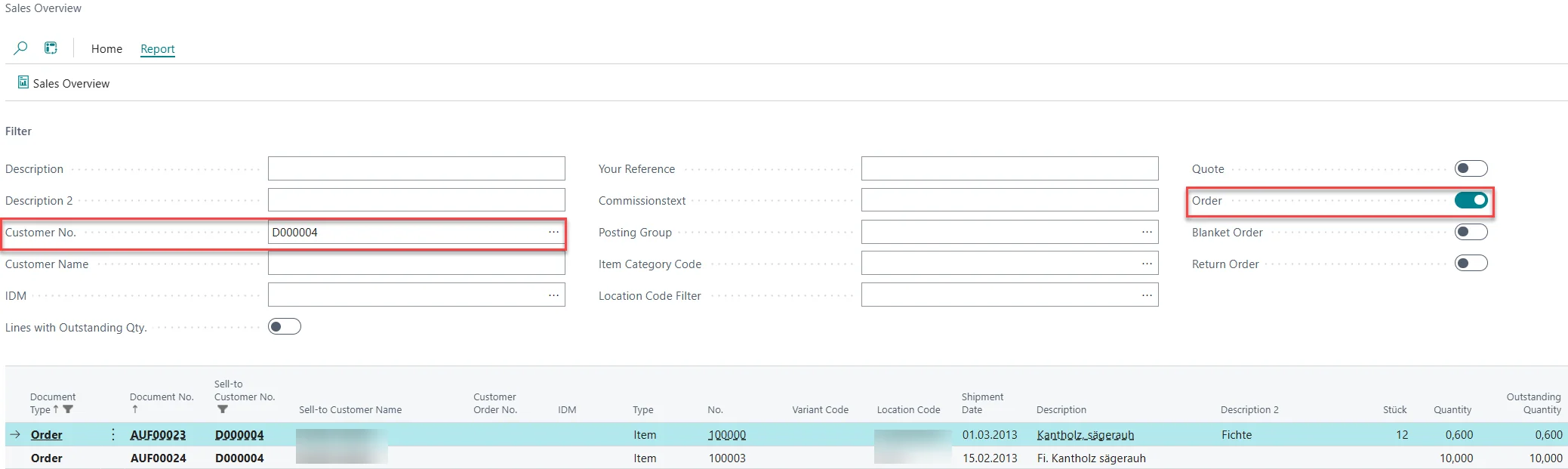
As there are quite a lot of Sales Orders, you would like to share the overview with the Customer. To do so, choose Report > Sales Overview in the top menu.
In the window that opens, the filters have been set as you selected them. Click on Preview to see what the overview looks like. Now, you can download the file and send it to the customer you have on the phone.
After using the sales overview, customer-related sales information can be checked and shared more quickly. This helps answer customer questions about quotes and orders including shipped items and open quantities, without manually collecting information from several documents.