



As a production planner or warehouse manager, you sometimes realize after finishing a production order that not all consumptions, outputs, or times were posted. Previously, you couldn’t reopen a finished order to correct these mistakes, which could lead to incorrect inventory values and extra manual corrections.
Let’s see how you can do so from Business Central version 26 onwards!
Go to Finished Production Orders.
Find the Production Order you need to correct and open it.
In the top menu, click Actions and Reopen.
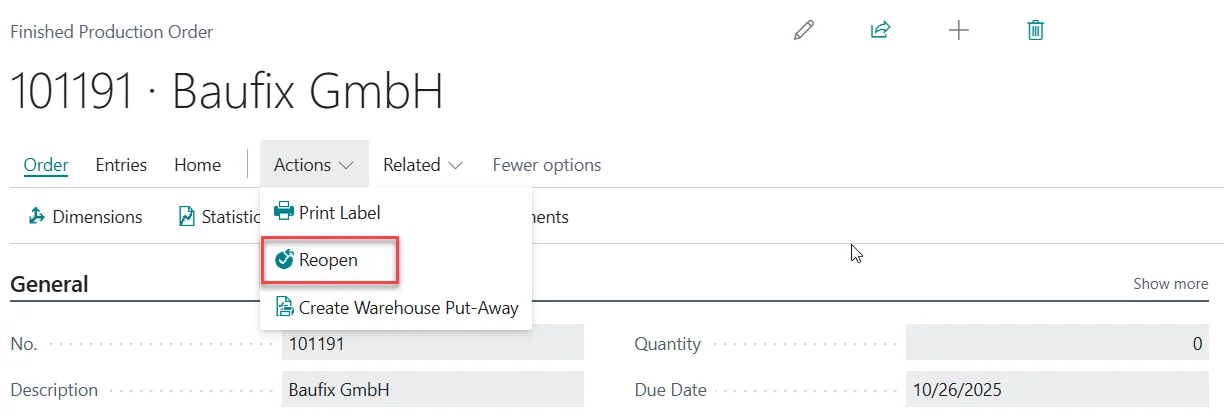
Confirm that you want to reopen the Production Order by clicking Yes twice when prompted.
The reopened Production Order will automatically open as a Released Production Order.
Correct any missing output, consumption, or time entries as needed.
Once all corrections are made, finish the Production Order again by clicking Change Status, selecting Finished as New Status and clicking Yes to close the order again.
By using the reopen feature, you can easily correct missing or incorrect postings on finished production orders, ensuring your inventory and financial data stay accurate without complicated workarounds.
Since this is a standard Business Central feature, you can find more information from Microsoft at: Reopen finished production orders | Microsoft Learn