



In our previous HowTo, we set up fixed freight charges per sales order. Imagine your customers complaining about these fixed freight costs, because the order value is high or because two orders are to be delivered at the same time and the charges are invoiced twice. Your sales team asks for an additional setup where the freight costs should be related to the total Sales Order value and furthermore, that is invoiced only once per requested delivery date. Luckily, that functionality already exists.
Let’s check how to set up extra charges per Shipment Method considering extended amounts.
Open Shipment Methods.
We will adjust the Shipment Method Delivery, which we created in the previous HowTo. Open the drop-down menu in the Additional Charge Code column & click +New.
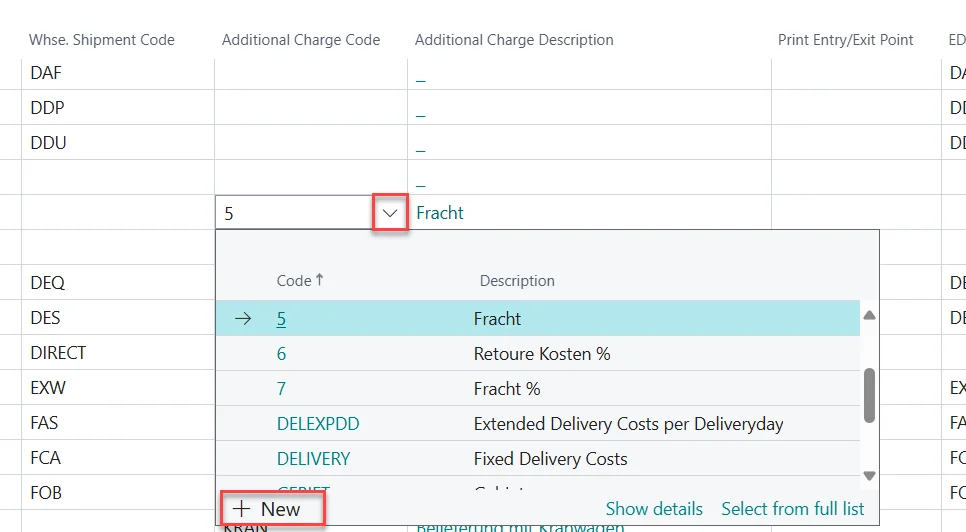
In the Additional Charges list that opens, enter DeliveryEx in the Code column and Extended Delivery Costs per Delivery Day as Description.
In the header action panel, click on the three dots and click Allocations.
In the Additional Charge Allocations window enter the Resource No. which you expect to be entered into a Sales Order for the fixed freight charges.
In the Calculation Type column, select Resource Sales Price (Extended Amounts).
Click on Extended minimum quantity calculation in the top menu.
Define the charge levels based on total document amount per delivery date in the Additional Charge Extended Amount overview by entering From Value of Goods in (LCY) and Price Excl. VAT, e.g. as follows.
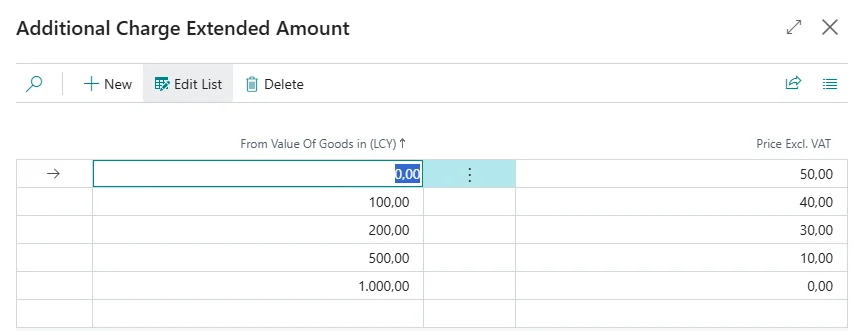
Confirm with Close.
To finish the setup, activate the column Calculation per Delivery Date for the Additional Charge Allocation.
Now, freight charges are calculated based on the total order value of a customer per requested delivery date. Making sure that your customer never pays too much and gets motivated to combine smaller deliveries.